
Subscribe to our newsletter
for the latest edTech news, free resources and competitions!
micro:bits Made Easy: 8 New Projects To Get Started
April 29, 2026
We know that micro:bits can feel intimidating, particularly to non-computing specialists. Many teachers think they're too technical, or can be time-consuming or difficult to set up. Read on to see how our new projects make it easy to use micro:bits in the classroom, whether you're a subject lead or completely new to teaching computing.
Myth #1: You need to be a programming expert
Using micro:bits can feel overwhelming - first there's the coding aspect, then the actual connecting it all to the computer, and then actually getting it to work...We know that teachers don't always have the time to develop coding skills, and often the children in the class can be a few steps ahead.
Our new micro:bit projects make the process easy. Here's how:
- A project video is included with every project
- The code is broken down and explained with a clear diagram
- A video on how to connect and transfer your code to the micro:bit is included
- Extension ideas are included
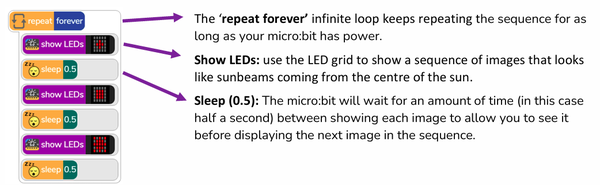
Code breakdown for Here Comes the Sun micro:bit project
All the projects are included in a Purple Mash subscription. Get a free trial and explore it for yourself.
Myth #2: Managing devices in class is too tricky
Lack of working devices or missing micro:bits? You're not alone! You can still deliver amazing micro:bit sessions thanks to the micro:bit emulator in the Free Code micro:bit program on Purple Mash. It shows children their code on a micro:bit so they can use it instead of a physical device, or they can use it to test their code before transferring to the micro:bit itself.
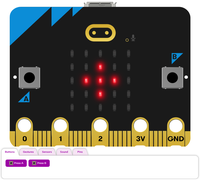
The micro:bit emulator
There is also the option of using the Group Working feature, where up to 6 children can work together on a single device.
Myth #3: It's just a 'fun extra' - not essential learning
Although the micro:bit projects (as well as units of work in the Purple Mash Computing scheme) are additional, optional sessions, they do address several key pillars in the CAPS curriculum.
1. Robotics (Strand: Robotics)
The micro:bit serves as the microcontroller, or "brain", of a robotics system. CAPS requires learners to understand the relationship between inputs (sensors) and outputs (actuators). The micro:bit includes built-in sensors such as a light sensor, temperature sensor, and accelerometer (inputs), as well as a programmable LED display (output), making it an ideal tool for meeting the Grade 4–9 CAPS requirements for identifying, understanding, and using electronic components.
2. Coding (Strand: Algorithms and Coding)
CAPS places a strong emphasis on computational thinking, including sequencing, repetition (loops), selection (conditionals), and problem-solving. Using the Microsoft MakeCode editor, learners can develop these skills in a visual, block-based programming environment during Grades 4–6, before progressing to text-based programming using Python or JavaScript in Grades 7–9. This provides a clear progression aligned with the Senior Phase CAPS curriculum.
3. Geography and Natural Sciences Applications
The micro:bit extends learning beyond Coding and Robotics by supporting practical, cross-curricular investigations in Geography and Natural Sciences. Learners can program the micro:bit to function as a digital thermometer, light meter, or data logger to collect and analyse real-world environmental data. For example, learners can investigate microclimates by measuring temperature and light levels in different locations, reinforcing enquiry-based learning and scientific investigation while developing data collection and interpretation skills.
If you would like to extend your learners or you have some Super Coders ready for a challenge, these projects can also be programmed in Python in Pieces (included in Purple Mash), getting them started on their journey to learning Python.
Purple Mash micro:bit Projects
Currently, there are 8 projects, with more to come. They have been split into Easy and Intermediate difficulty:
Easy micro:bit projects
- Here Comes the Sun: make a sunbeam animation
- Jukebox: Create a music machine to play different tunes
- Emotion Badge: Use the micro:bit to show different emotions
- Sunlight Sensor: Make your micro:bit react to light
- Thermometer: Show how hot or cold your school is
Intermediate micro:bit Projects
- Night Light: Make a light that switches on automatically when it gets dark
- Step Counter: Track how active you are
- Conductivity Tester: Investigate if a material conducts electricity