
Subscribe to our newsletter
for the latest edTech news, free resources and competitions!
micro:bits Made Easy: 8 New Projects To Get Started
April 29, 2026
We know that micro:bits can feel intimidating, particularly to non-computing specialists. Many teachers think they're too technical, or can be time-consuming or difficult to set up. Read on to see how our new projects make it easy to use micro:bits in the classroom, whether you're a subject lead or completely new to teaching computing.
Myth #1: You need to be a programming expert
Using micro:bits can feel overwhelming - first there's the coding aspect, then the actual connecting it all to the computer, and then actually getting it to work...We know that teachers don't always have the time to develop coding skills, and often the children in the class can be a few steps ahead.
Our new micro:bit projects make the process easy. Here's how:
- A project video is included with every project
- The code is broken down and explained with a clear diagram
- A video on how to connect and transfer your code to the micro:bit is included
- Extension ideas are included
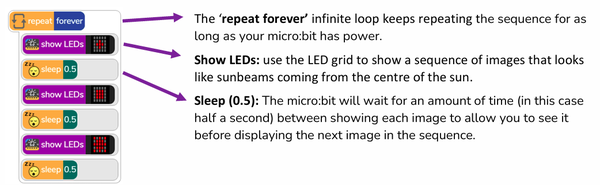
Code breakdown for Here Comes the Sun micro:bit project
All the projects are included in a Purple Mash subscription. Get a free trial and explore it for yourself.
Myth #2: Managing devices in class is too tricky
Lack of working devices or missing micro:bits? You're not alone! You can still deliver amazing micro:bit sessions thanks to the micro:bit emulator in the Free Code micro:bit program on Purple Mash. It shows children their code on a micro:bit so they can use it instead of a physical device, or they can use it to test their code before transferring to the micro:bit itself.
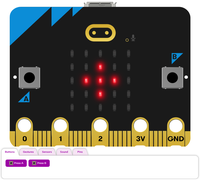
The micro:bit emulator
There is also the option of using the Group Working feature, where up to 6 children can work together on a single device.
Myth #3: It's just a 'fun extra' - not essential learning
Although the micro:bit projects (as well as units of work in the Purple Mash Computing scheme) are additional, optional sessions, they do cover KS2 Computing National Curriculum objectives:
- design, write and debug programs that accomplish specific goals, including controlling or simulating physical systems; solve problems by decomposing them into smaller parts
- use logical reasoning to explain how some simple algorithms work and to detect and correct errors in algorithms and programs
- select, use and combine a variety of software (including internet services) on a range of digital devices to design and create a range of programs, systems and content that accomplish given goals, including collecting, analysing, evaluating and presenting data and information
The micro:bit projects can also be used as part of science lessons, for logging light, temperature and conductivity.
If you would like to extend your UKS2 learners or you have some Super Coders ready for a challenge, these projects can also be programmed in Python in Pieces (included in Purple Mash), getting them started on their journey to learning Python.
Purple Mash micro:bit Projects
Currently, there are 8 projects, with more to come. They have been split into Easy and Intermediate difficulty:
Easy micro:bit projects
- Here Comes the Sun: make a sunbeam animation
- Jukebox: Create a music machine to play different tunes
- Emotion Badge: Use the micro:bit to show different emotions
- Sunlight Sensor: Make your micro:bit react to light
- Thermometer: Show how hot or cold your school is
Intermediate micro:bit Projects
- Night Light: Make a light that switches on automatically when it gets dark
- Step Counter: Track how active you are
- Conductivity Tester: Investigate if a material conducts electricity