
Subscribe to our newsletter
for the latest edTech news, free resources and competitions!
Physical Programming with Purple Mash: Purple Chip
Nov. 3, 2026
Give children real-life context to their coding by programming a physical device - something they can control with their code off-screen. Purple Chip, is a Purple Mash app which allows students to control an external device using code created in 2Code Purple Chip.
What is Purple Chip?
Using the Purple Chip app in conjunction with our 2Code Purple Chip tool on Purple Mash allows students to control an external device (a phone or tablet) from code that has been written in and run from within Purple Mash.
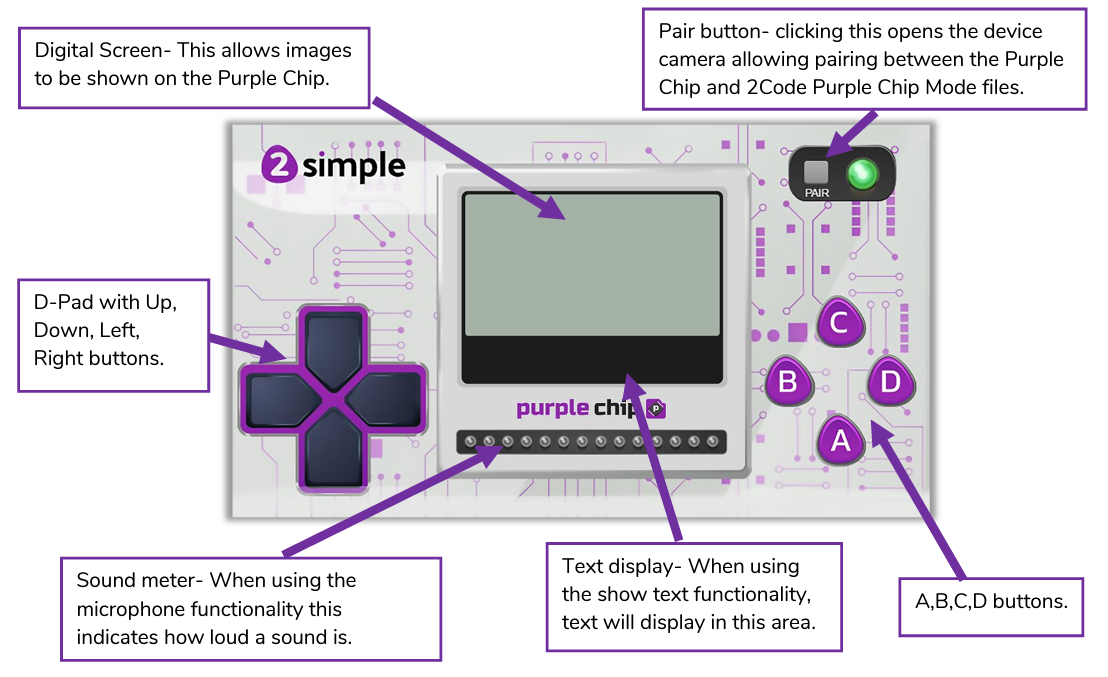
When you download the Purple Chip app, it looks like a handheld gamepad:
What can students do with Purple Chip?
With the Purple Chip app and 2Code Purple Chip tool, students can:
- Use the device's microphone to detect sound
- Use the device's speakers to play a sound
- Program tilt, shake and vibrate commands
- Program the device to flash using the device's torch
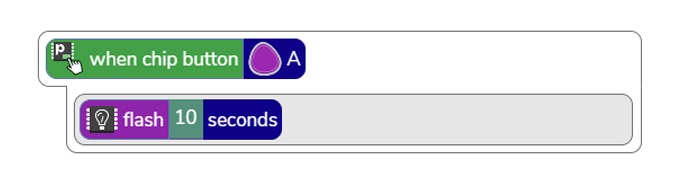
They might, for example, write some code for when button A is pressed, the device's light flashes for 10 seconds:
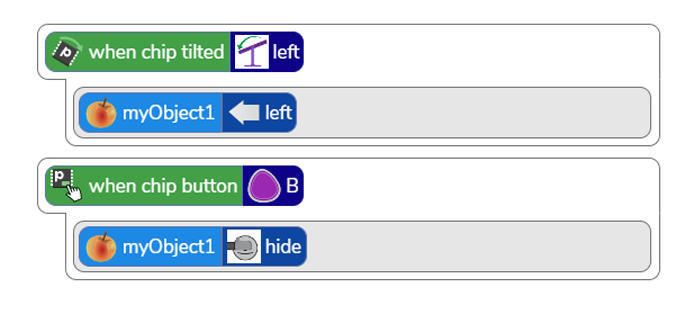
They could also use the device as a controller for their game. For example, they might code their sprite to move left when they tilt the device left, or to disappear when button B is pressed:
Take a quick tour with this video:
Where can we download the Purple Chip app?
You can download the Purple Chip app for iOS or Android.
We'd love to see what your class create with this app, so please do tag us on social media!

