
Subscribe to our newsletter
for the latest edTech news, free resources and competitions!
Mai-Z the MouseBot in the Classroom
Sept. 9, 2026
Whenever we release something new, we make sure that it's been tested by schools first. This time, it was the turn of Parkwood Primary School, and they were lucky enough to try out the new Mai-Z the MouseBots in their Year 3 and 6 classrooms in July.
Over two 90-minute sessions, the pupils explored physical computing through the programming of Mai-Z the MouseBots in a range of challenges, including navigating a town and playing robo-football!
What is Mai-Z the MouseBot?
Designed for hands-on learning, the Mai-Z is a versatile educational robot built for the BBC micro:bit. Mai-Z has lots of great features, including:
- Line-following sensors
- Central pen holder
- Front ball scoop
- Distance sensors
- Cliff edge detection
- Onboard speaker
- Sturdy chassis
- USB-C rechargeable
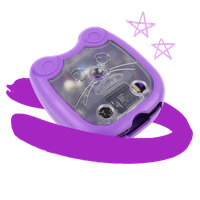
Mai-Z the MouseBots are available to buy from 2Simple, in an exclusive purple colour, and with teaching resources included.
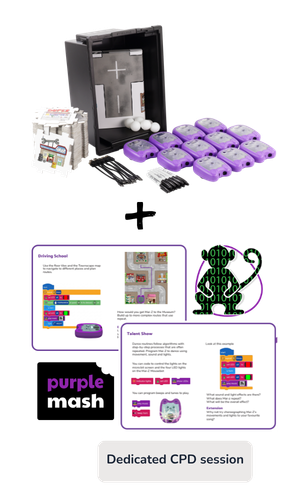
When you buy the MouseBots from 2Simple in a set, you'll also get access to Mai-Z MouseBot in 2Code, additional KS1 and KS2 units in the Computing Scheme of Work, lesson plans, slideshows and classroom activities, AND a dedicated CPD session to show you how to use them!
In the set, you'll receive:
- Mai-Z MouseBot Floor Robots
- USB-C Charging Cables
- Double-Sided Map/Line Following Posters
- A2 Features Poster
- Sharpies
- Table Tennis Balls
- Gratnells Storage Tray & Lid
- Floor Tiles & Road Tiles
Getting Started with Mai-Z the MouseBot
In a short demonstration, pupils were introduced to three coding challenges on the interactive whiteboard:
- To the Woods
- Drive to School
- To the Museum
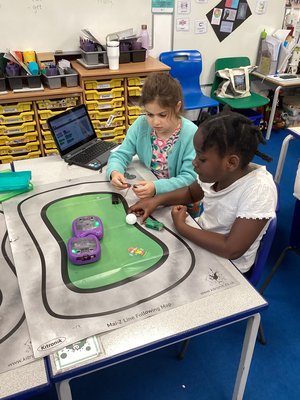
Working in small groups, each team received a Mai-Z the MouseBot, a micro:bit, and an Around Town activity mat. After learning how to assign their group number to the MouseBot and transfer their code from Purple Mash to the micro:bit, it was time to see what Mai-Z could do.
Coding, Testing and Problem-Solving
Pupils used the Around the Town Freecode to programme their MouseBot to travel around the town map. They chose a location to drive to and added loot that Mai-Z would collect along the way.
Once they had got to grips with Freecode, the pupils were also able to navigate their MouseBot around a racing track, and carefully maneuvre around obstacles.
The final challenge brought plenty of excitement as groups teamed up to play football using ping pong balls. This required careful radio control of the MouseBot, excellent teamwork and plenty of problem-solving to score a goal.
An enthusiastic response from pupils
The enthusiasm in both classes was clear from the very beginning. The pupils were completely engaged and excited to programme their Mousebot, eagerly tackling each new challenge and experimenting with different solutions. Year 3 and Year 6 both asked for extra sessions to do more programming with Mai-Z!
High praise from staff
The impact was certainly noticed by the school staff, with one teacher commenting that "Mai-Z should be compulsory for all children" because of how focused and engaged the whole class had been, explaining that the group included several pupils with SEND - including SEMH and behavioural needs - yet every child was keen to participate, solve problems and try new ideas.