
Subscribe to our newsletter
for the latest edTech news, free resources and competitions!
Mash of the Month May - Tracklab
May 3, 2026
Our #MashOfTheMonth for May is Tracklab, Purple Mash's powerful yet simple-to-use multitrack composition tool. Tracklab allows students to create music like never before with a range of amazing features. The video below gives you an overview 👇
Making Music in Primary Computing Through Digital Composition
While music-making is not listed as part of the National Curriculum for Computing, it is a popular unit of work in Computing Schemes, and digitally-created music is become more commonplace. Digital Audio Workstations (DAWs) are central to modern music production (Hopkins, 2026), with more than 70% of professionals now using them (ReAnIn, 2025) Of course, professional-level tools are far too complex for primary classrooms, but Tracklab gives children an accessible introduction to the same creative process used in modern music production.
Tracklab helps pupils explore:
- Sequencing and layering tracks
- Recording audio directly
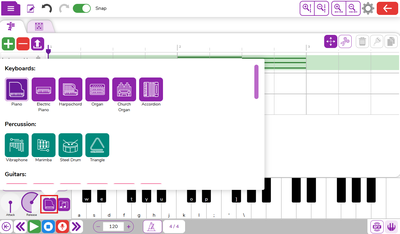
- Experimenting with built-in instruments, drums and chords
- Enhancing music with sound effects
Simple Primary Music Lessons Which Don't Require Specialist Knowledge
In addition to being brilliant for making music within the computing curriculum, Tracklab is of course perfect for music lessons - without needing a specialist music teacher!
With Tracklab, music creation is visual and interactive, and built in the same familiar, easy-to-navigate design that makes all Purple Mash tools so well loved in classrooms.
Features of Tracklab
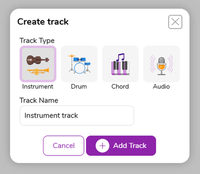
Instrument track:
Record an instrument track using a range of in-built instrument emulators or using the library of instrument recordings
Drum track:
Users can record their own drunk track segments using a range of in-built drum emulators. It also has a library of drum tracks that can be added.
Chord track:
Add chords to the composition in a similar way to the instrument track type. There is a free play keyboard with instrument emulators to choose, and also a chord library.
Audio track:
The audio track allows users to create an audio recording from a microphone. Pupils can also upload pre-recorded audio from their computer.
Pupils can also:
- Add, delete, move and copy audio tracks
- Snip, copy, move and delete audio segments
- Glue audio segments together
- Adjust volume and mute audio tracks
- Add special effects to tracks
Sharing completed tracks is easy too: users can save and share with a link, in 2Email, as a blog, or on a display board. They can also export as a WEBM file.
Join a Live Lesson
This month, we're launching a competition for Year 6 students to compose their own Leavers' Song in Tracklab, so it's the perfect opportunity to hit play on music making! We're hosting two Live Lessons, designed for the whole class to enjoy and learn about music production and song writing, and to get started with their competition entries. You can sign up below. The Live Lessons will be recorded and added to the 2Simple YouTube channel for teachers to use at a time that's convenient to them.
Enter the Competition
We will be launching a new competition for 2026 on the 18th of May! The Tracklab Competition will give Year 6 students the opportunity to showcase their creativity and musical skills in teams of 2-6 to create a song about their time at Primary School.