
Subscribe to our newsletter
for the latest edTech news, free resources and competitions!
10 Time-Saving Purple Mash Features
Aug. 4, 2026
Teachers have very busy days, so we've put together a guide to how Purple Mash can save you time. With these 10 teacher time-saving features, you might even have time to grab a cuppa in the staffroom!
1. Save Time with our Schemes of Work
Purple Mash is most well-known for its brilliant whole-school Computing Scheme of Work, which has been refreshed and revised this year. With the new scheme there are new units and some brilliant useability features.
Teachers now no longer need to download slides, and can display and annotate them all within the platform. Units can have teaching dates added, and then a unit teaching calendar can be generated for your class, year group, or whole school.
Isn't that amazing?! BUT...
...Purple Mash doesn't just do computing!
There's also an Online Safety Scheme, a Spelling Scheme of Work for Years 1-6, and a Grammar for Writing Scheme.
2. Assign and mark Work online with 2Dos
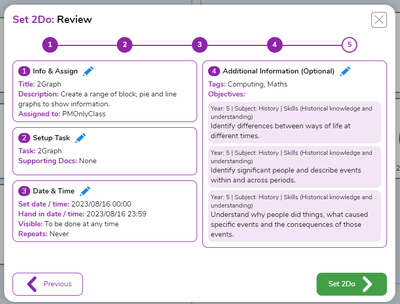
The 2Dos feature on Purple Mash is used to set work for a class, individual pupils or groups. Use it for setting work for future lessons, or for setting homework.
Here's how 2Dos can save you time:
- Set work for the future (i.e. a series of lessons, or weekly homework such as spelling quizzes)
- Assign learning objectives to assess against
- Easily see who has/has not completed their work
- Add written or verbal feedback to individual or multiple 2Dos at once, as well as objective judgements
- Quizzes are automatically marked, cutting down on your marking time even further
3. Track Progress in the Data Dashboard
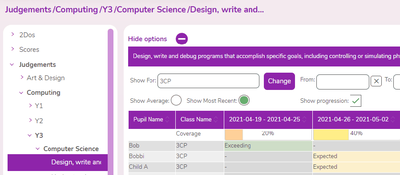
The scores and judgements from 2Dos are also collected in the Data Dashboard, where you can export them to an Excel spreadsheet, show progression and averages, as well as gathering evidence for objectives.
4. Organise Resources in Work Folders
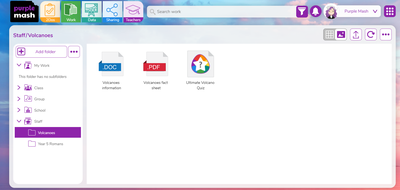
Share work easily between teachers in your school with the Work Folders. Simply add resources to folders inside the Staff folder, and any staff with a Purple Mash account will be able to use those same resources. You can even upload your own files from your desktop, including .PDF, .PPT and .DOC files.
Example folders could include:
Year 5 Letter Writing
Year 3 Science - Animals, Including Humans
Year 4 Phonics Intervention
Year 6 SATs Practice
5. Use Editable Templates to Personalise Learning
Use the editable writing templates inside the subject folders to quickly create your own differentiated resources for your pupils. A few things you can alter are:
- Image and text boxes
- Choosing and adding your own images to the clipart gallery
- The 'Think About' guide to give children tips and sentence starters
- The 'Checklist' which is perfect for adding success criteria
- Write sentence starters or prompts directly on the template
- The background image of the template
Once you are happy with the template, you can save it into your work folder, a shared folder, or set it as a 2Do.
6. Save Even More Time with Purple Mash AI
The Purple Mash AI Add-On allows you to differentiate resources even faster than doing it manually.
With Purple Mash AI in 2Publish, you can adapt resources to suit the needs of your learners. This includes adding differentiated checklists, ‘Think About’ prompts and other scaffolds in just a few clicks. There’s also the option to translate all of these scaffolds into different languages, allowing further support for EAL children.
You can also create curriculum-aligned quizzes in seconds with Purple Mash AI in 2Quiz, as well as create quizzes in multiple languages (or adapt existing quizzes!).
7. Give your Students a 2Challenge
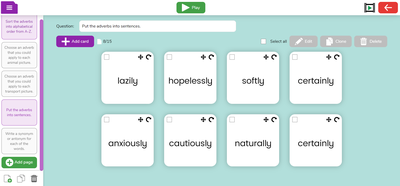
Also inside the Teacher Tools tab is 2Challenge, a fantastic tool that's perfect for morning work, lesson starters or exit tickets. Even better - there are already loads of ready-made activities, including ones for topic work. Choose an activity that fits with your current learning, or make your own. It's easy to quickly create a bundle of activities, meaning you'll be all set for the next few weeks!
8. Lead The Way with Subject Leader Toolkits
Purple Mash is mostly known for being a computing scheme of work, so of course we'd have a Computing Leader's Toolkit for all of our brilliant Computing Leads! But we've also got them for English, Maths, Science and Foundation Subjects!
You can find out more about the toolkits and what's included inside them here.
9. Use Mash Club Resources for an Instant Computing Club
Have you been asked to run a club this year, but you've no idea
a) What club you want to run, and
b) How you'll find the time to plan and resource it?
Then Purple Mash is here to help: try Mash Club, 3 terms of resources for a computing club!
Children will learn to code and blog with step-by-step detailed instructions for each session to make it as easy as can be for you, the teacher. As well as the eight sessions for each term, there is a Getting Started Guide and printable resources which include certificates and name badges.

10. Get Inspired with a 1-1 Chat
Stuck on how to do something on Purple Mash and just can't figure it out? Need some fresh ideas on which tools and resources you can use within your topic?
Book a free 30 minute 1-1 Chat to save yourself hours of frustration! They're free for our Purple Mash users, easy to book and we've lots of appointment times. Just book your slot here and one of our team will help you through your problem. They'll usually screenshare with you, so you can follow exactly what they're doing.